
INSTALL

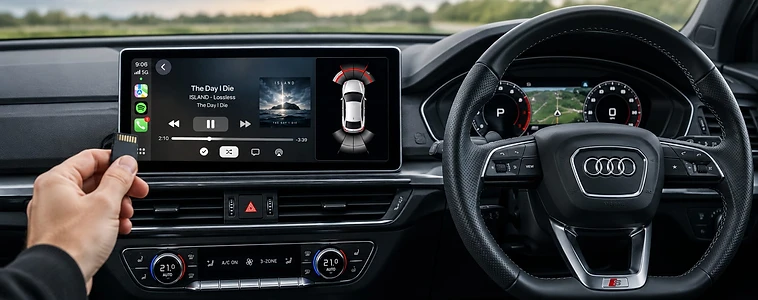
An SD card. Your existing system.

No additional screen to mount, no hardware to fit. The package loads through the Audi software update menu, so your cockpit stays exactly as Audi built it.

The short answer

TheNavMan.com activates Apple CarPlay — and Android Auto — in the Audi Virtual Cockpit with a software-only update for MHI2Q, MHI2 and MH2P cars: £99 one-time, installed from an SD card in 10–30 minutes, with no dealer visit and no hardware fitted. Check your car free first, then the build arrives in your client portal; support is Monday–Friday, 9am–6pm UK time on chat, WhatsApp and email.

A hand holding an SD card ready for the Audi's card slot, with CarPlay playing through the cockpit screen beside it
The install

Download. Copy. Update.

Three steps and the car does the rest. Straightforward — no technical skills needed — and illustrated instructions come with every order.

Step 01Instant after checkout

Download

Your download is in the client portal the moment you've paid — sign in with the email address you checked out with (your confirmation email has a create-account link), and it stays there so you can grab it again any time.

Sign in to your portal
Step 02A few minutes

Copy to an SD card

Unzip it onto a 16 or 32GB SD card, then slot the card into the car's SD 1 port. On a Mac, run dot_clean on the card first so its hidden ._ files don't stop the update.

Step 0310–30 minutes

Run the update

Start it from the Audi Engineering Menu and let the car do the rest.

Error codes & fixes

An SD card

16 or 32GB, Class 10 or better, formatted FAT32. A micro SD card in an adapter is fine.

A computer or laptop

Windows or Mac both work, to unzip the package onto the card.

Active CarPlay & Android Auto licences

Your car needs its CarPlay and Android Auto licences enabled (the FEC) for the upgrade to work. Message us with your VIN if you're not sure yours are.

NavMan Bot · install help

Stuck on a step? Ask me about the install.

Ask in your own words — which SD card, how the Engineering Menu opens, how long it takes, or an error code the car has put on the screen.

Rollback included

Always reversible

Every order ships with a rollback package. If you ever want the original software back, you can restore it from your client portal with the same SD-card process.

Guaranteed wired

No hardware changes

The package works wired over USB, guaranteed. Wireless CarPlay and Android Auto work too with a confirmed adapter that plugs into the car's USB port.

TheNavMan.com for Audi

Your next route.
In your Virtual Cockpit.

CarPlay + Android Auto. Installation and rollback packages. Access to your files and support in the client portal.

  • ✓ We check compatibility before payment.
  • ✓ Free firmware update included if your car needs it.
  • ✓ Rollback package to restore your original setup.
  • ✓ Lifetime updates at no extra cost.
  • ✓ Step-by-step install guides in your portal.
  • ✓ Real support from a real person, not a bot.
£99.00 GBP

$125.79 USD

Cluster Mod Update + Software

One-time payment
  • › CarPlay & Android Auto in the Virtual Cockpit
  • › Free firmware update included if your car needs it
  • › Free future updates for life
  • › Rollback package to restore the original setup
  • › Client portal — downloads, guides & support
Buy now · £99.00 GBPCheck compatibility

$125.79 USD