



CarPlay map zoom
Adjust the CarPlay map zoom with the steering-wheel scroll wheel.
Apple CarPlay onlyCarPlay and Android Auto on your Audi's original displays. Maps, turn guidance and album artwork in the Virtual Cockpit, with the centre screen available for other apps.
Navigation runs in the Virtual Cockpit while the centre MMI screen does something else — Apple Music, another app, or the original Audi menus. Neither screen waits for the other.
Open the cockpit’s media page to see the album cover, track title, artist and album from CarPlay or Android Auto.
Choose CarPlay / AA view for your phone’s navigation or OEM view for the original Audi map, directly from the cockpit’s Display menu.
The original navigation remains available alongside TheNavMan.
Steering-wheel shortcut
Press and hold the steering-wheel OK button for a few seconds to switch back to the Audi map.
CarPlay and Android Auto turn guidance also appears on the factory heads-up display, including junction and roundabout directions.
Requires a compatible factory HUD already fitted to the car.
CarPlay and Android Auto are designed to work wired over USB — that's the connection every installation is confirmed on, and it's guaranteed. Wireless is supported as well: a small adapter plugs into the car's USB port and links your phone without the cable, so the same CarPlay and Android Auto appear the moment you get in.
Wired
Guaranteed
Use the Virtual Cockpit’s original phone menu while CarPlay is connected. See incoming calls and answer or reject them with the car’s controls.
One-press Siri
Use a single press of the steering-wheel voice button to activate Siri while CarPlay is connected.
Apple CarPlay only
Steering-wheel shortcuts, MMI Touch and your cockpit’s display layouts.
Adjust the CarPlay map zoom with the steering-wheel scroll wheel.
Apple CarPlay onlyNavigate Apple CarPlay using your Audi’s MMI Touch surface.
Apple CarPlay · MMI Touch requiredDouble-press OK to alternate between the street name and arrival time with remaining distance.
Steering-wheel OK buttonUse a single press of the steering-wheel voice button to activate Siri while CarPlay is connected.
Apple CarPlay onlyUse the layouts available in your Virtual Cockpit.
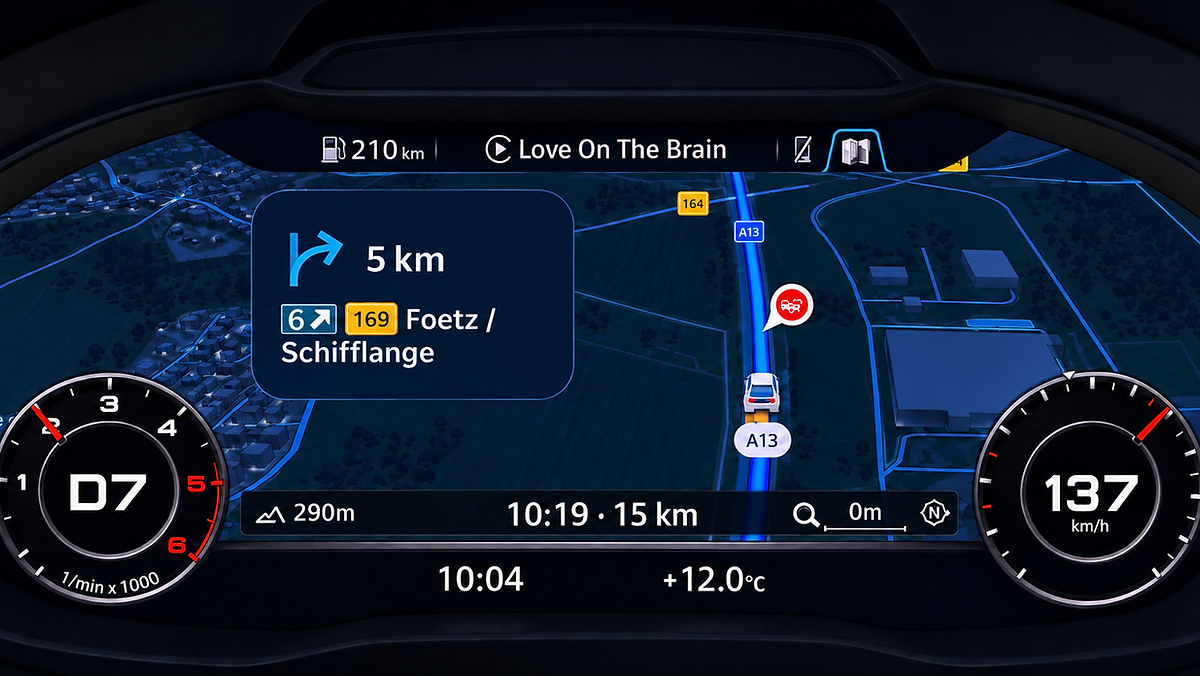
Show the street name or your estimated arrival time and remaining distance in the cockpit’s navigation area. Double-press the steering-wheel OK button to switch between the two displays.
Every order arrives in your own portal with the files, the guides and the steps already in the right order. The user & features guide walks through the whole of it.
A software installation for compatible factory equipment.
Download the package prepared for your vehicle and follow the supplied instructions. Apple Maps, Waze and Google Maps then display in the Virtual Cockpit.
A rollback package and instructions are included to restore the original setup.
Access your vehicle’s downloads, support chat and bug reports from your TheNavMan account.
MHI2Q · A3 8V MHI2 · MHI2 AUG22 · MH2P
US, EU, JP and CN, with a compatible Audi Virtual Cockpit.
Some wireless CarPlay and Android Auto adapters do not work with TheNavMan.
CarPlay + Android Auto. Installation and rollback packages. Access to your files and support in the client portal.
$125.79 USD
Cluster Mod Update + Software
$125.79 USD
